I made a custom iOS "widget" to track my hangouts
Make sure to check out my technical post on this project!
I try to maintain a lot of relationships and it got to the point where I needed a way to remember who I hung out with and who I still need to see. A simple list of names would not satisfy me. I needed a visual.
I started by building a widget.
The Pipeline
The pipeline for this project from hangout to widget is a little bit convoluted.
- An Apple shortcut saves a name(s) to a .csv file on my iCloud
- Each night, a python script on my Mac reads the .csv file and creates an image (the widget)
- My Mac replaces the last day's image with the new one in a one-photo-only photo album
- My phone uses a photo widget to display the album, displaying the last day's hangouts
Behind the scenes, there's a lot of silly interactions just to make the widget work. Firstly, the widget is barely a widget. It's a photo album. Secondly, the widget requires my laptop to process data that will start and end on my phone. That being said, there are a lot of nice user experiences I left for myself in this project. The user (me) only has to click a widget on my home screen to add a name to the list. What ended up being helpful was that now I know when I forget to log a hangout. The prior day would be unexpectedly empty!
Designing the Widget
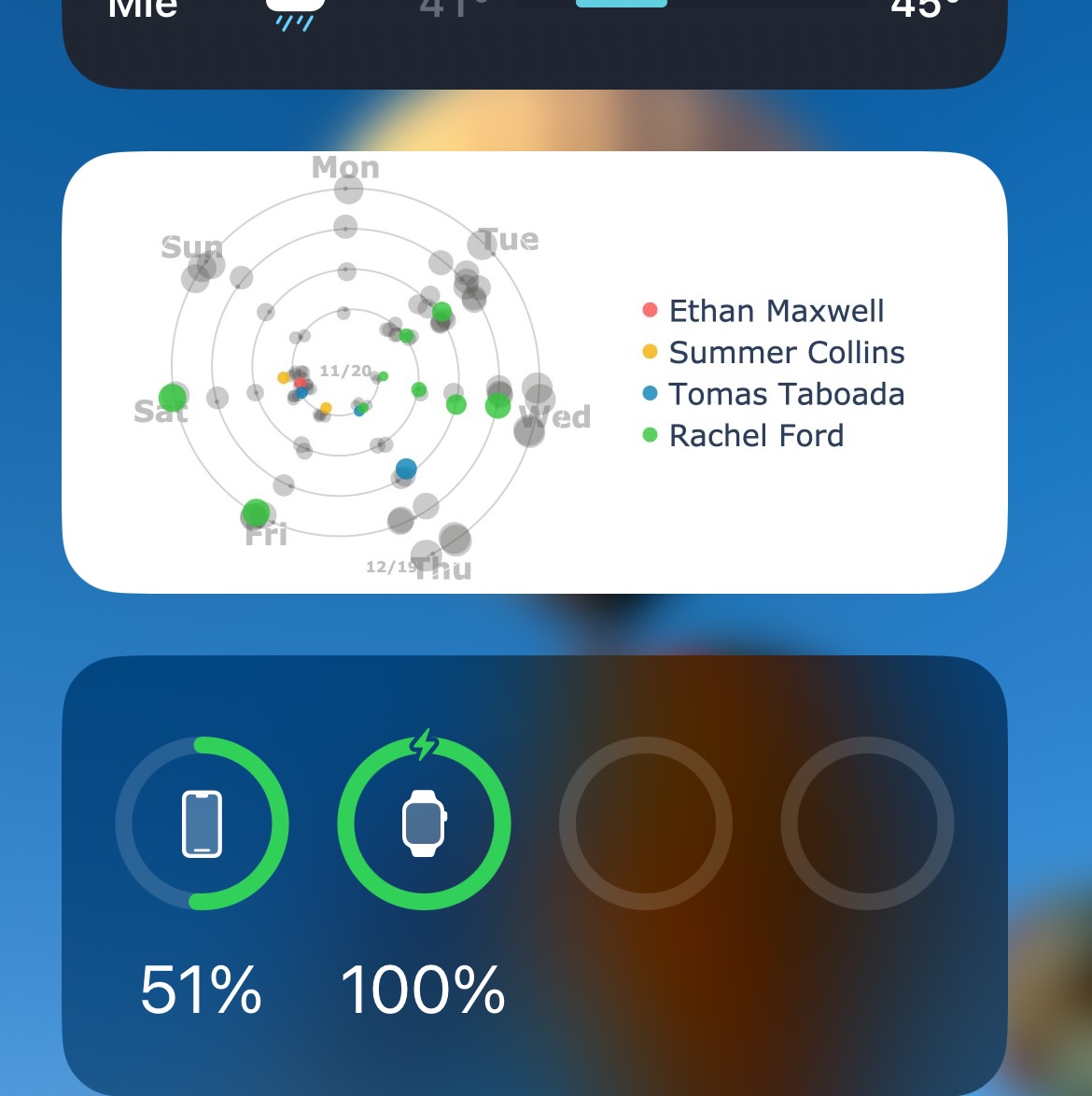
I knew I wanted to display some sense of periodicity. I'm a creature of habit. Some people I see every week, some people I see every month. Some on Tuesdays, some sporadically. This was my main design concept for this visualization.
A first natural idea was to display a heatmap of people I see, as a sort of calendar. I wanted to provide some individuality to the data, so my first attempt had a list of names vertically and highlighted a day if I hung out with that person. This resulted in an ugly stack of names with boxes that were mostly empty. Even my closest friends looked distant with 5+ empty boxes between weekly hangouts. In a widget, with limited space, there was no way to display this as a heatmap.
Another idea was to make a graph, where nodes are people and edges are whether I saw them on the same day. This sounded like a good idea, but when I finally implemented it, it didn't show the relationships I wanted it to. I hoped that it could somehow reveal the relationships and groups of the people I see, but really it just highlighted days of the week. People that had never met were closely grouped together, because I would regularly see some people in the afternoon and others in the evening. This too was a dead end.
The driving design concept for the final image was to display a timeline of sorts. I realized that I could display a month as a spiraling timeline, where days of the week line up with the same angle. Then, I could see which days I hung out with the most people and who I'm hanging out with each day. I had older days towards the center of the widget, like a tunnel through time. Days where I saw more people would dynamically jitter the dots more, allowing each person to still be individually visible (though unidentifiable). Knowing that the final target was to make a widget, some other design decisions were made. I couldn't include a legend with a ton of names, so I decided to highlight only a couple of names each day. This was a great idea, as now the visualization gave me something to focus on. This had another positive side effect, I could now use that random list of names to remind me to reach out to people I haven't seen or thought about in a while.
Reflection
I'm proud of the final product. It's something I get to use every day and it has been a great way to keep track of my relationships. Knowing that I had a final product made the process a lot more design-centric. I needed to continuously balance the visualization's user experience alongside its ability to display the data. The silly interactions between my phone and my laptop give it a lot of charm that no one would necessarily know about on first glance. Overall, the project is one that I am eager to show people and it only took a few hours to build.